September 9th, 2026
Users has moved out of Settings and into the main sidebar as Team, a module of its own.

What's new
🧭 Team lives in the main sidebar
Settings → Users is gone; everything you used there is now under Team.
Getting started
Open Team in the main sidebar. It's already there for every administrator.
(Optional) Drag it up or down, or hide it, from Customize Sidebar like any other item.
August 27th, 2026
Improved
The Event Details card used to sit at the bottom of the job sidebar, so checking when a job was scheduled meant scrolling past everything else. Now it lives in the job header: the date is always visible, and the full detail is one click away..
What's new
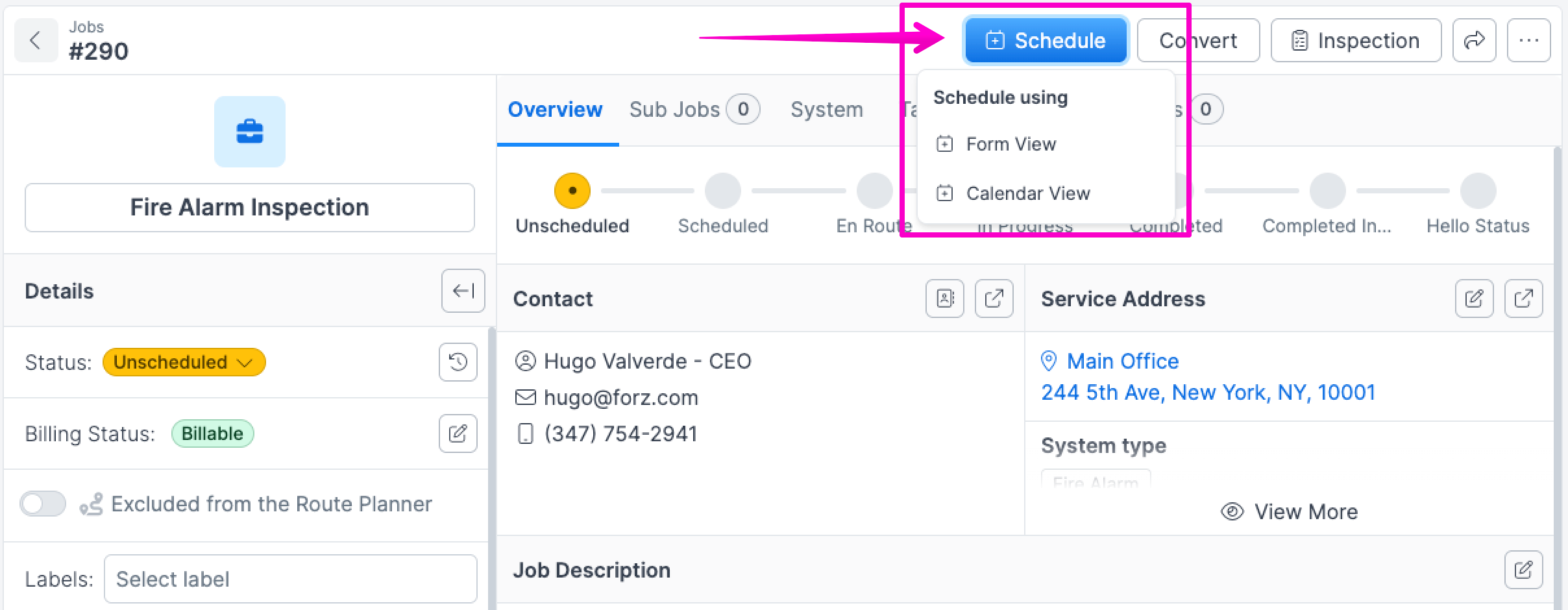
To schedule an event, click the "Schedule" button in the job header.
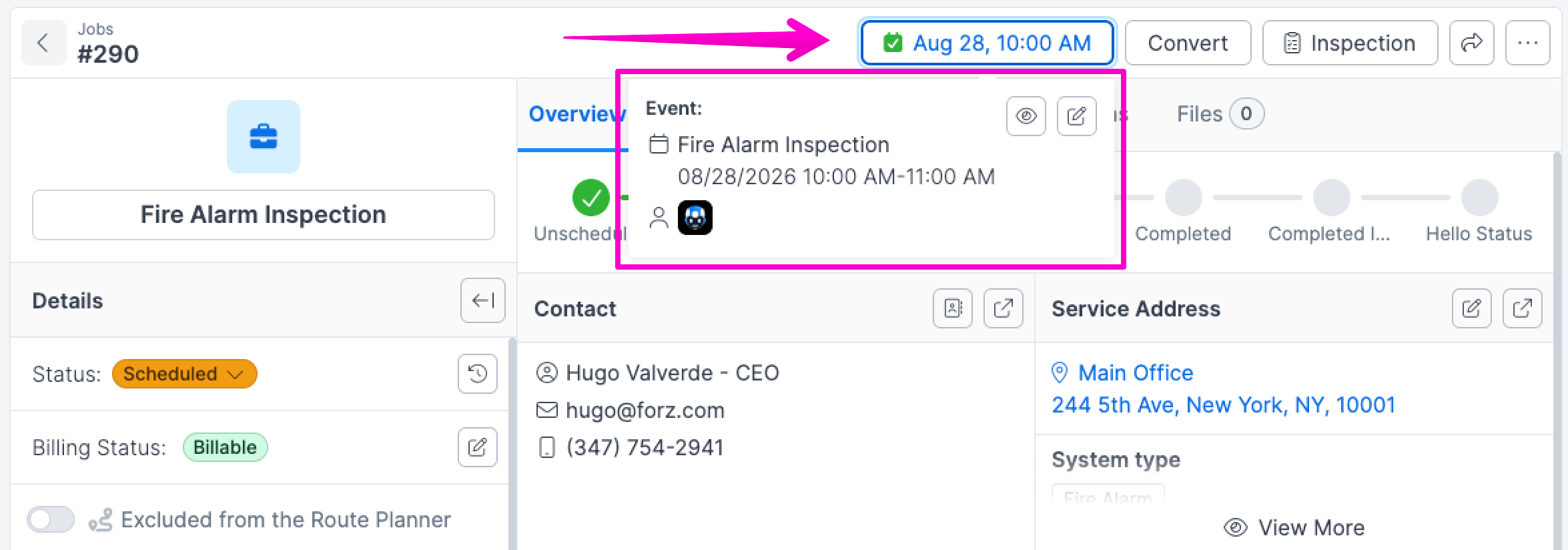
Once scheduled, the button displays the event date and time. Click it to see the full event details in a popover.
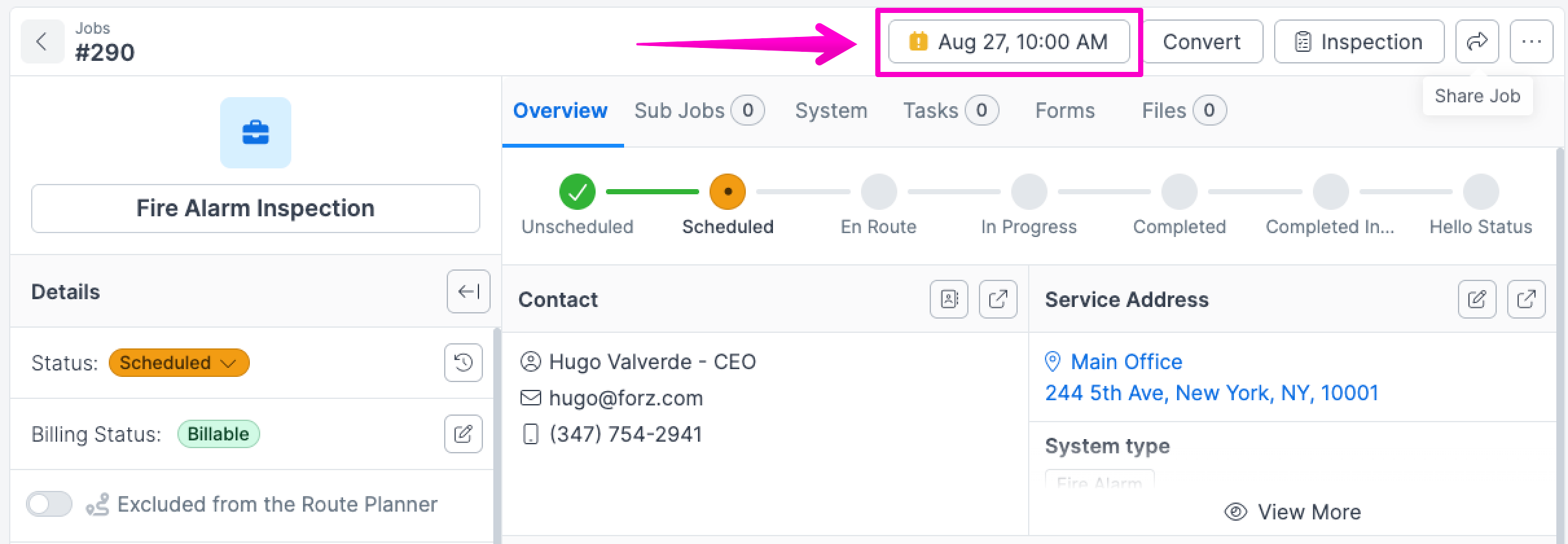
When an event is overdue and the job isn't completed, the button shows a yellow icon to flag it.
August 17th, 2026

The map showed you where today's work was, but not how the day connects — who goes where, in what order. Routes fixes that by drawing each technician's day as a colored line through their stops, right on the map.
What's new
🗺️ The Routes overlay — a new Routes chip on the Map page. Turn it on and every technician's scheduled visits for the day are connected into a colored line in visit order, with direction arrows so you can read the flow of the day at a glance.
🔢 Numbered stops for a single technician — set Schedule For to one technician and their pins get numbered badges — 1, 2, 3 — in visit order. If a filter or an unloaded page means the map can't hold the whole day, numbering steps aside and the arrows keep the order readable, so a mid-afternoon job is never mislabeled as stop 1.
🎨 A legend with stable colors — the map legend lists each drawn technician with their color and stop count. Colors stick to the technician, not the drawing order, so a line never changes color as you filter down to it.
🔗 Shareable views — the Routes toggle lives in the URL. Copy the link and a teammate opens the exact same view, on the same day.
Up to 5 technicians' routes draw at once — beyond that, the legend asks you to pick a technician. Lines connect stops in order as straight lines; for optimized turn-by-turn driving routes, use the Route Planner.
Why it matters
The day's plan on one screen. See who covers which area, and in what order, without opening a single job.
Spot the outlier before the truck rolls. A stop far off a technician's line is a reassignment opportunity you can catch in the morning, not at 4 PM.
Faster dispatch conversations. "Look at Marcus's route" is now a link, not a description.
Getting started
Open Map from the sidebar.
Click the Routes chip above the filters.
(Optional) Set Schedule For to a technician to see their numbered stop order.
Available now on all plans with the Map enabled. A technician needs at least two mapped stops on the day to draw a route.
June 1st, 2026
Global search could only find things — and finding a record, creating one, and jumping between screens were three separate trips. Quick Command replaces it with a single ⌘K launcher that does all of it from the keyboard.
What's new
⚡ One launcher, opened from anywhere — press ⌘K (or Ctrl K), tap /, or click ⚡ Quick Command in the navigation. One overlay to find a record, jump to a screen, create something, or run an action — without reaching for the mouse.
🔍 Search across everything — start typing to match Jobs, Customers, Estimates, Invoices, and more as you go. Narrow to a single type with a prefix like job:130.
🕘 A useful starting screen — open it and you see your Recent items and a short list of Quick actions (New Job, New Estimate, New Customer, and more) instead of a wall of options. Everything else is one keystroke away.
⚙️ Run actions, not just searches — flip the theme, open sidebar settings, and other actions sit right alongside your records and screens.
Why it matters
Find and do, in one place. No more bouncing between a search box, the menu, and a New button.
Back to what you were doing, fast. Recent puts the jobs and customers you just touched one keystroke away.
Built for the keyboard. Open, type, arrow, Enter — the front desk never has to leave the keyboard during a call.
Only what you can reach. Quick Command respects your permissions, so it never shows screens or records you can't open.
Getting started
Press ⌘K (Mac) or Ctrl K (Windows) from any screen.
Start typing to find a record, or pick a Quick action to create something or jump somewhere.
Press ↓ to highlight an item and Enter to open it.
Available now for everyone — Quick Command replaces Global Search across Forz.
Full step-by-step guide in the Help Center.
May 1st, 2026
Completed jobs were silently going unbilled because office staff had no single place to see them. Unbilled Jobs fixes that with a dedicated queue, smart per-job controls, and visibility on every job page.
What's new
📋 The Unbilled Jobs queue — a new page at Jobs → Unbilled (also a sidebar item with a live count badge). Lists every job in a "ready to bill" status that doesn't yet have a finalized invoice. Each row gives you the right next action in one click: Create Invoice, Add Products, or Review Draft.
⚙️ You decide what "ready to bill" means — a new Billing tab in Settings lets you flag any job status as a billable trigger (e.g. Completed, Signed Off, Ready to Invoice). Toggle on and the queue picks up matching jobs immediately. Toggle off any time.
🚫 Mark jobs as Not Billable, with a reason — some completed work shouldn't be invoiced: warranty calls, service-plan visits, internal or comp work, jobs bundled into a parent. From any unbilled row, click the ⋯ menu and pick a reason — the job leaves the queue but stays auditable.
Reasons supported: Warranty, Service Plan, Internal, Bundled (parent), Other. Reversible from the Job page.
🏷️ Default reason per Job Type — if you have a dedicated Warranty Callback or Internal Maintenance Job Type, set its Default Non-Billable Reason once. New jobs of that type are pre-marked so they never land in the queue by mistake.
💰 Billing summary on every Job page — a new panel shows Invoiced / Paid / Outstanding at a glance, with a per-invoice breakdown when there's more than one. Backed by Paylines so split payments attribute correctly.
Why it matters
No more silent leakage. If it's signed off and not billed, it's on the queue.
One screen, multiple trades. Per-tenant status configuration means HVAC, fire safety, plumbing, electrical, cleaning, and facilities operators can each define "done" their own way.
Office workflow, not field admin. Marking a job non-billable is a one-click reason picker.
Per-job clarity. Every Job page now shows what's been invoiced and what's still outstanding — without leaving the record.
Getting started
Go to Settings → Billing and turn on the job statuses that mean "ready to bill" for your business.
(Optional) Open Settings → Job Types and set a Default Non-Billable Reason for any types that should be excluded automatically.
Open Jobs → Unbilled in the sidebar — your queue is live.
Available now on all plans where Jobs and Invoices are enabled.
February 23rd, 2026
We’re excited to introduce a new and improved way to share your ideas, report issues, and tell us what you need most!
Your feedback helps shape the future of Forz — and now it’s easier than ever to send it directly from within the app.
▶️ Check out our step-by-step video tutorial:
What’s New?
Open the Send Feedback tool directly from the sidebar.
Choose between Feature Request, Bug Report, or Feedback.
Describe your idea or issue in detail.
Attach screenshots using the handy Take a Screenshot button so our team clearly understands your needs.
Use highlight, draw, and comment tools to explain things visually.
Submit your request — and that’s it!
Why This Matters
Whether you have a cool new feature idea, spotted a bug, or just want to help us improve, there’s now a single, intuitive place to do it all. Submitting feedback helps us prioritize improvements that matter most to you — and gives you a direct line to our team.
📚 Have you visited our Help Center yet?
Explore full step-by-step guides to quickly understand how to get the most out of Forz.
If you have any questions or feedback, we’d love to hear from you!
February 17th, 2026
Managing contacts just got faster, cleaner, and more powerful.
We’ve upgraded contact management in Forz to help you reduce duplicates, stay organized, and connect your data more efficiently.
▶️ Watch the Full Walkthrough Playlist
What’s New?
Easier Contact Creation
Create contacts faster with improved fields and a smoother workflow.
🔶 View VideoLink Existing Contacts
Quickly connect contacts to Customers, Vendors, Jobs, and more — without extra steps.
🔶 View VideoNew Contact Actions
Merge duplicates, set a primary contact, and manage relationships with greater control.
🔶 View VideoDuplicate Contact Warning:
Get notified when similar contacts already exist to keep your database clean and accurate.
✨ These improvements help you spend less time managing data — and more time getting work done.
📚 Explore the full step-by-step guides in the Help Center:
If you have any questions or feedback, we’d love to hear from you!
January 9th, 2026
We know that every field service team operates differently. To help you work faster and reduce clutter, we’ve introduced Customizable Sidebar Navigation. You can now tailor your menu to match your unique workflow, ensuring your most important tools are always just one click away.
What’s New:
Show & Hide Modules: Toggle specific modules on or off to keep your sidebar clean and focused on the tasks that matter to you.
Drag-and-Drop Reordering: Easily reorganize your navigation menu. Move your high-priority modules to the top for quicker access.
Auto-Save Sync: Any changes you make are saved instantly and automatically across your session—no "Save" button required.
Cleaner UI: Enjoy a more streamlined interface by hiding the features you don’t use daily.
How to get started:
Click the Sidebar Customization icon at the top of your sidebar to open the customization panel and start organizing your workspace today.
Pro Tip: Try placing your most frequent modules (like Jobs or Invoices) at the very top to minimize scrolling during busy hours!